System Manager

Administration scope

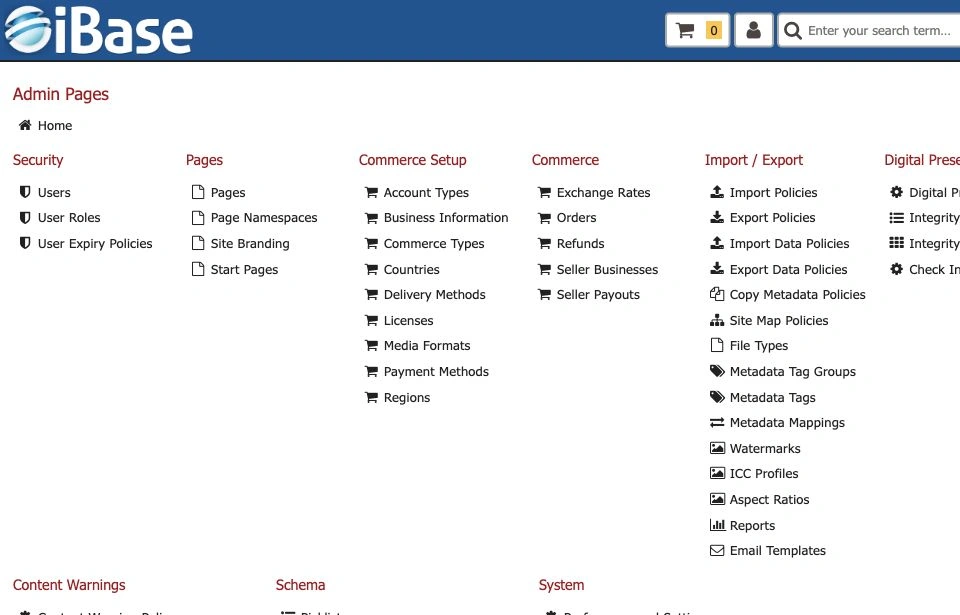
The Administration area is for high-permission users who manage configuration, security, operational tooling and system-wide behaviour. The live Admin page groups tools under Security, Pages, Commerce Setup, Commerce, Import / Export, Digital Preservation, GDPR, IIIF, Content Warnings, Schema, File Locations and System.

Important: this page is a starting guide, not a replacement for project-specific administration notes. Keep local change-control, backup and support procedures with the system documentation.

Manage users, roles and expiry policies

The Security area includes Users, User Roles and User Expiry Policies.

  • Use Add User to create accounts only for people who need access.
  • Use the user list fields such as roles, status and email address to check account state.
  • Use Edit to review or update an existing user.
  • Assign roles based on the minimum permissions needed for the job.
  • Use expiry policies for temporary users, contractors, project access or time-limited review groups.
  • Review high-permission accounts regularly.

Maintain pages, branding and commerce setup

The Admin page separates page configuration from commerce setup and commerce operations.

  • Pages includes Pages, Page Namespaces, Site Branding and Start Pages.
  • Commerce Setup includes account, business, commerce type, country, delivery, licence, media format, payment and region configuration.
  • Commerce includes exchange rates, orders, refunds, seller businesses and seller payouts.
  • Document changes that affect public display, sales workflows or user-facing delivery options.

Maintain schema and controlled configuration

Schema changes affect item types, fields, validation, search and metadata workflows. The Schema area includes picklists, subjects, lists, labels, periods, relationships, sort fields, sort orders, geolocation categories, quick search aliases, index building and audio/video event kinds or tracks.

  • Document why a field, controlled value or search setting is being added or changed.
  • Check how the change affects search, edit forms, imports, exports and existing records.
  • Consider whether written help pages need updating when schema or vocabulary changes.

Use import and export tools carefully

Import / Export includes import policies, export policies, import data policies, export data policies, copy metadata policies, site map policies, file types, metadata tags, metadata mappings, watermarks, ICC profiles, aspect ratios, reports and email templates.

  • Keep a copy of source files and export outputs.
  • Test import mappings before applying them to live content.
  • Review row counts, validation messages and failed records.
  • Limit export access to users who understand the data being extracted.
  • Use Reports for configured administrative or operational reporting, checking output format and date range before running a report.

Digital preservation and file operations

Digital Preservation includes policy, integrity checks, integrity results and Check Integrity actions.

  • Run preservation tasks as planned work, not as casual result-list actions.
  • Record task scope, selected items and outcomes.
  • Investigate failed integrity checks before taking corrective action.
  • Coordinate surrogate creation with storage, preview and delivery requirements.

System-wide settings

Administration also includes Content Warnings, File Locations and System settings such as preferences, cookie policies, documentation, quick start guide and credits.

  • Make one deliberate change at a time where possible.
  • Check the user-facing impact after each change.
  • Update internal notes and relevant help pages after configuration changes.
  • Contact iBase support before changing unfamiliar system-level settings.
Keyboard shortcuts: older iBase guidance lists shortcuts such as upload, create, edit, select, download, save and cancel. Because shortcut availability can depend on page state and browser focus, verify shortcuts in the current Sprint screen before including them in task-specific training.